ZETLAN TECHNOLOGIES
Course Categories 172+
Cloud & Infrastructure 7
Networking 8
Virtualisation 5
IT Security 10
CyberSecurity & Mgmt 14
Software Development 16
Web Dev & Database 27
Data Science & AI 14
Mobile, Testing & Games 22
Design & Creative 49
Navigation
Home Business About Us Contact Us All Courses FAQ & Help
Contact Us
+91 8680961847 +91 8680961847 (WhatsApp) info@zetlantechnologies.com
Browse by Domain
Cloud & Infrastructure 7
Networking 8
Virtualisation 5
IT Security 10
CyberSecurity & Mgmt 14
Software Development 16
Web Dev & Database 27
Data Science & AI 14
Mobile, Testing & Games 22
Design & Creative 49
2000+ Courses · 15+ Technology Domains
Microsoft Cisco AWS EC-Council View All Courses
Home  /  VMware Certifications  /  VCP-DCV
🔥 Trending Certification · 2024 [v2]

VMware Certified Professional
Data Center Virtualization (VCP-DCV)

Validate your professional-level knowledge and skills with VMware vSphere solutions, including virtual machines, networking, storage and vSAN. VCP-DCV is the gold standard certification for virtualization administrators, system engineers and consultants working in modern data centers.

vSphere 8.x vSAN Networking & Storage vCenter vSphere with Tanzu Industry Recognised Career Defining
Enroll Now
vSphere 8.x ArchitectureESXi, vCenter & cluster design
vSAN & Storage PoliciesSoftware-defined storage
Distributed SwitchesAdvanced networking & NIOC
vSphere with TanzuKubernetes on vSphere
70
Exam Questions
135
Minutes Duration
300
Passing Score (Scaled)
$250
USD Exam Fee
Why It's Trending

The Gold Standard for Virtualization Professionals

VMware vSphere remains the backbone of enterprise data centers worldwide, and VCP-DCV is one of the most recognized professional certifications in virtualization.

Trending
80%
Of Enterprises Run VMware vSphere
vSphere remains the dominant virtualization platform across global data centers.
50K+
Open Virtualization Admin Roles
VCP-DCV is consistently listed as a top requirement for infrastructure roles.
Trending
Top
Career-Defining Credential
VCP-DCV is widely regarded as a benchmark certification for virtualization professionals.
+30%
Average Salary Uplift
VCP-DCV certified professionals report significant salary advantages over peers.
Certification Path

Data Center Virtualization Certification Path
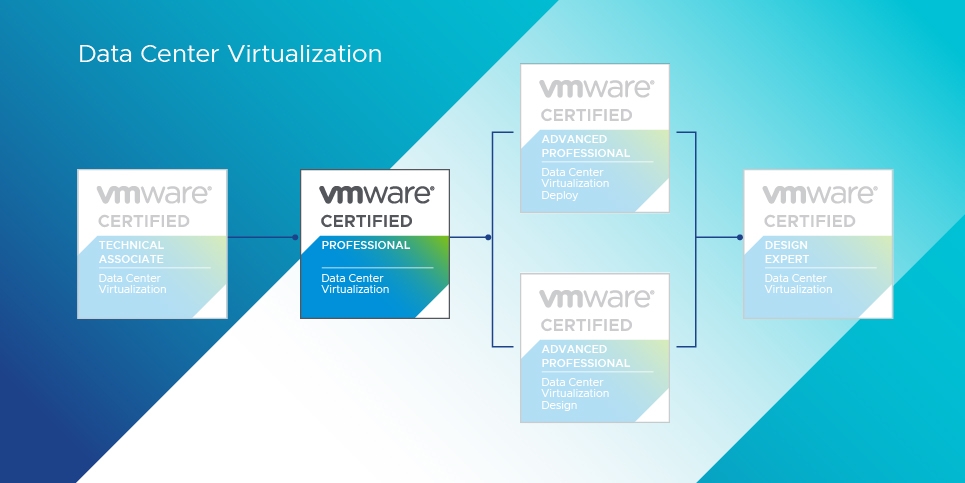
VCP-DCV Certification Path
Exam Overview

Exam 2V0-21.23: VMware vSphere 8.x Professional

Language
English
Duration
135 Minutes
Total Questions
70
Passing Score
300 (Scaled 100-500)
Format
Single & Multiple Choice, Proctored
Pricing
$250 USD

VMware exams are scaled on a range from 100–500, with the determined raw cut score scaled to a value of 300. Your exam may contain unscored questions in addition to the scored questions — this is standard testing practice and results reflect performance on scored questions only.

Course Content

Complete VCP-DCV Curriculum

Click any module to expand and explore the topics covered in detail.

01
Architectures and Technologies
13 Topics
Identify the pre-requisites and components for a VMware vSphere 8.x implementation
Describe the components and topology of a VMware vCenter architecture
Describe storage concepts (protocols, datastore types, vSAN, vVOLs, RDM, PMem, NVMe)
Describe VMware ESXi cluster concepts (DRS, EVC, HA, fault tolerance)
Explain the difference between standard and distributed switches
Describe VMkernel networking, NIOC and networking policies
Describe VMware vSphere Lifecycle Manager concepts
Describe the basics of VMware vSAN as primary storage (ESA for vSAN 8)
Describe the role of Virtual Machine Encryption and Trust Authority
Recognize methods of securing virtual machines (vTPM, BIOS vs UEFI, VBS)
Describe identity federation architecture and use cases
Identify use cases for VMware Tools
Describe the high-level components of vSphere with Tanzu (Supervisor Cluster, Zones, TKG)
02
VMware Products and Solutions
4 Topics
Describe the role of VMware vSphere in the Software-Defined Data Center
Identify use cases for VMware vCenter Converter
Identify disaster recovery (DR) use cases (replication options, SRM)
Planning and Designing considerations
03
Installing, Configuring, and Setup
16 Topics
Describe and configure single sign-on (SSO)
Configure vSphere distributed switches
Configure VSS advanced networking options
Set up identity sources (identity federation, LDAP)
Deploy and configure VMware vCenter Server Appliance (VCSA)
Create and configure HA & DRS advanced options
Deploy and configure vCenter High Availability
Set up and subscribe to content libraries
Manage VM template versions and updates
Configure vCenter file-based backup
Configure vSphere Trust Authority and certificates
Configure vSphere Lifecycle Manager, network stacks and host profiles
Identify ESXi boot options (Quick Boot, Secure Boot)
Deploy and configure clusters using vSphere Cluster Quickstart
Set up and configure VMware ESXi (time, services, lockdown, firewall)
Configure VMware vSphere with Tanzu (Supervisor Cluster, TKG, Zones, Namespaces)
04
Performance-tuning, Optimization, Upgrades
12 Topics
Identify resource pools use cases
Explain shares, limits and reservations
Monitor resources of VCSA and vSphere 8.x environment
Identify and use resource monitoring tools
Configure Network I/O Control (NIOC) and Storage I/O Control (SIOC)
Configure a virtual machine port group offloaded to a DPU
Explain the performance impact of VM snapshots
Use Update Planner and vSphere Lifecycle Manager for updates
Use performance charts to monitor performance
Perform proactive management with VMware Skyline
Update VMware vCenter using management interface
Complete lifecycle activities for vSphere with Tanzu
05
Troubleshooting and Repairing
3 Topics
Identify use cases for enabling vSphere Cluster Services (vCLS) retreat mode
Differentiate between main management services in ESXi and vCenter and their log files
Generate a log bundle
06
Administrative and Operational Tasks
10 Topics
Create and manage virtual machine snapshots
Create virtual machines using OVF templates and content library
Manage virtual machines (settings, per-VM EVC, latency sensitivity, CPU affinity)
Manage storage (datastores, storage policies, storage cluster options)
Create DRS affinity and anti-affinity rules
Migrate virtual machines (Storage vMotion, Cold Migration, vMotion, Cross vCenter Export)
Configure role-based access control
Manage host profiles and utilize vSphere Lifecycle Manager
Use predefined alarms and create custom alarms in vCenter
Deploy and manage encrypted virtual machines
FAQs

Frequently Asked Questions

Why does the VCP-DCV 2024 have a year designator as its version?
Data Center Virtualization solutions are frequently updated. Having a year as its certification version allows VMware to better maintain the exam and training content, and more importantly, provides certification candidates a way to communicate how current their skills are in relation to other certifications.
Do I have to complete requirements in the order listed?
No, however we strongly recommend that you do so. Also, please note that successfully registering to take an exam does not imply that you meet the certification requirements in full.
How do I share my VCP-DCV 2024 badge?
When you've earned a VMware badge, you will receive an email notification alerting you to claim your badge. When you accept your badge, you'll be brought immediately into a sharing workflow that allows you to share to Facebook, Twitter, and LinkedIn, embed in a personal website, or share over email.
What are the benefits of a badge?
A single source that combines your credentials and provides a complete overview of your skills. Digital badges allow you to easily share your accomplishments on social media. They also provide employers with easy, valid verification of your VMware credentials.
Is the VCP-DCV exam proctored?
Yes. The VCP-DCV exam is a proctored exam, meaning a proctor monitors the exam to protect its integrity and validate that the candidate is answering questions independently.
Do I need a prerequisite before taking VCP-DCV?
Candidates must meet the certification requirements which may include completing a VMware-authorized training course. Check the current VMware certification requirements before scheduling your exam.
Get Started

Advance Your Career with VCP-DCV

Join Zetlan Technologies' VCP-DCV programme and master vSphere 8.x — the industry-standard platform for enterprise virtualization.

Zetlan Technologies
Online — Replies in minutes
👋 Hi! Welcome to Zetlan Technologies.

Interested in VMware Certified Professional - Data Center Virtualization (VCP-DCV)? Ask us anything!
Just now
Course Fee? Batch Timings? Exam Details
Open WhatsApp Chat
Your info is safe with us
💬 Chat with us!